CALLBACK REQUEST DEMO

See callback requests in action

Press play to hear how the receptionist captures who called, why they called and when they would like a response.

  • Captures caller name and contact number
  • Records the reason for the callback
  • Notes the preferred callback time

No commitments. Cancel anytime.

Designed for quick mobile setup when you need cover fast.

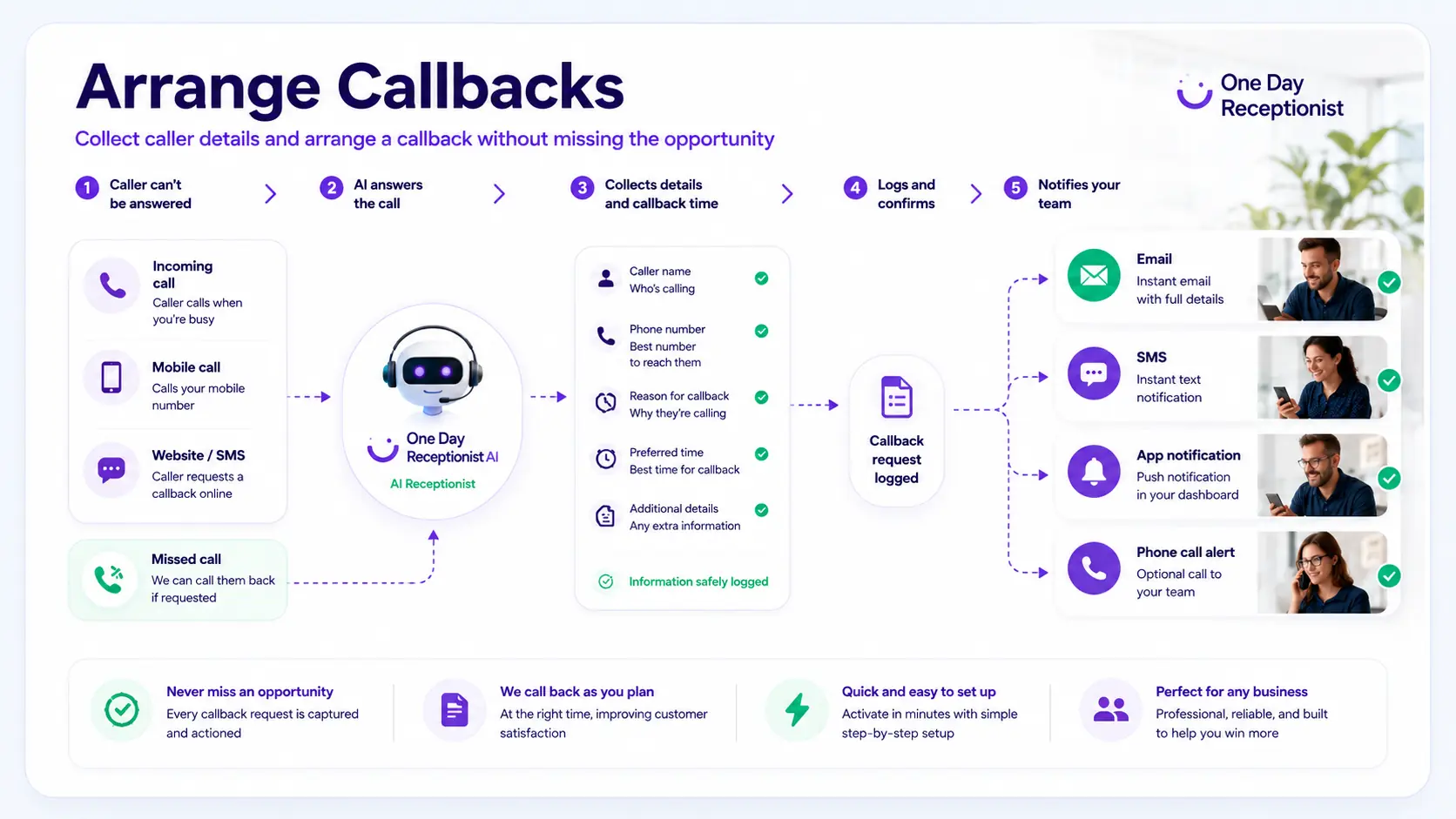
Arrange Callbacks flow showing caller details captured and sent for follow-up

ARRANGE CALLBACKS COVER

Turn missed calls into clear callback requests

When you cannot answer straight away, callers get a calm response and your team gets the details needed to call back with context.

1. Caller asks for help The receptionist answers and checks what the caller needs.
2. Details are captured Name, phone number, reason for calling and urgency.
3. Callback time is noted The caller can say when they would prefer a response.
4. Your team receives it The callback request is sent to your chosen contact.

SETUP WALKTHROUGH

See how callback setup works from start to finish

Choose callback cover, answer the guided questions, preview the wording, activate, then forward calls to your temporary number.

Choose callback cover Answer guided questions Preview before activation Forward calls when ready

CALLER EXPERIENCE

What callers hear

The caller gets a clear answer. You get the details needed to call them back properly.

1

Caller rings

The receptionist answers politely using your approved greeting.

2

Callback need identified

It checks whether the caller wants the team to call them back.

3

Details are captured

It collects name, number, reason, urgency and preferred callback time.

4

Summary sent

You receive the callback request so your team can respond.

WHAT IT COLLECTS

More than just taking a name and number

The receptionist can answer simple caller questions from your approved setup details, then capture the callback request and send the handover by SMS and email.

?

Answers simple questions

Uses your approved business details for simple questions about opening hours, website, location, service areas and standard instructions.

Captures the request

Collects who called, their contact number, why they called, urgency and when they would prefer a response.

Sends the handover

Sends the callback request to your chosen contacts by SMS or email, depending on your setup and provider delivery.

EXAMPLE OUTCOME

Example callback request

A typical handover gives your team enough context to return the call without guessing.

CallerSarah Mitchell
Number07xxx xxx xxx
ReasonWants a quote and has a question before booking
Preferred callbackThis afternoon
UrgencyNormal, unless the caller wording suggests urgent

GOOD FOR

Good for callback-heavy days

Use it when callers need acknowledgement, but you cannot return every call immediately.

Owners between jobs

Capture callback requests while travelling, working or speaking to customers.

Teams returning calls later

Collect clean details before your team calls back.

Staff absence

Keep callback requests moving when cover is thin.

Busy periods

Use callback cover when answering live is unrealistic for the day.

Important notes

Not for emergency calls or urgent high-risk situations. Includes £10 call credit, typically enough for around 80 minutes of AI receptionist call time, depending on call length and network/provider charges. Notifications depend on correct contact details and third-party email, SMS and network providers. See Terms, Usage & Refunds.

FAQ

Common questions

Can it promise a callback time?

No. It can capture the caller’s preferred callback time and pass that to you, but it should not promise that your team will call at a guaranteed time unless you configure that wording.

Can it send callback details by SMS/email?

Yes. Callback summaries can be sent to your chosen handover contacts. Delivery depends on correct details and third-party providers.

Can it handle urgent wording?

It can mark the request as urgent based on caller wording, but it is not for emergency or high-risk situations.

When do I get the temporary number?

The temporary receptionist number is provided after payment and activation.

What happens after 24 hours?

1 Day Cover runs for 24 hours from activation. Calls should stop being forwarded when cover ends unless you reactivate.

Can I reactivate later?

Yes. Setup can be saved for 12 months so future reactivation is quicker.

Are SMS/email notifications guaranteed?

No. Summaries are sent to your chosen contacts, but delivery depends on correct details and third-party providers.
Need callback cover today?

Set up once, choose your cover length, then activate when ready.

Answer the essentials from your phone, then refine the wording before going live.

From £50 per day 24-hour cover from activation Fair usage applies